
Imagine stitching your own unique designs onto shirts, blankets, or even gifts! Sounds amazing, right? But when you start looking for a home embroidery machine, it can feel overwhelming. There are so many different kinds, and it’s tough to know which one is best for you.
Many people dream of adding a personal touch to their projects, but the sheer number of features and price points can make choosing a machine feel like a big puzzle. You might worry about spending too much money or getting a machine that doesn’t do what you need it to. We get it!
That’s why we’ve put together this guide. We’ll break down what you need to know so you can confidently pick the perfect home embroidery machine. You’ll learn about the important features to look for, understand the different types of machines, and discover how to find one that fits your budget and your creative dreams. Get ready to transform your crafting!
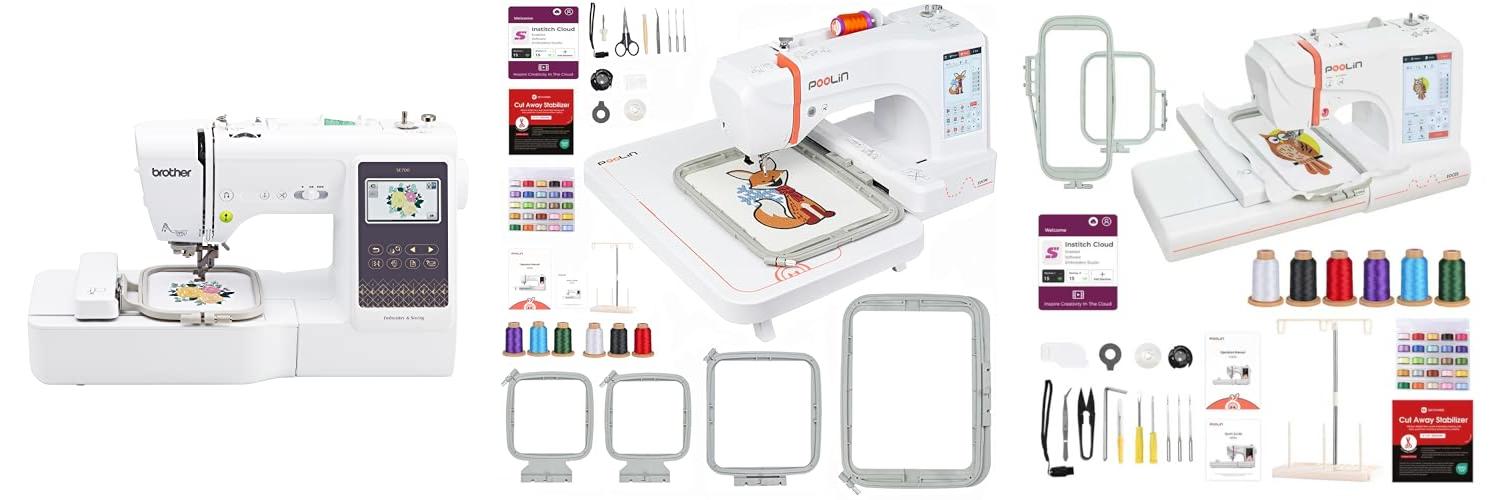
Our Top 5 Home Embroidery Machine Recommendations at a Glance
Top 5 Home Embroidery Machine Detailed Reviews
1. Brother SE700 Sewing and Embroidery Machine

Rating: 9.2/10
Ready to dive into the exciting world of sewing and embroidery? The Brother SE700 Sewing and Embroidery Machine is your perfect starting point. This versatile machine combines sewing and embroidery features, making it ideal for beginners and seasoned crafters alike. With its wireless capabilities and user-friendly touchscreen, personalizing your projects has never been easier.
What We Like:
- Seamlessly switch between sewing and embroidery tasks.
- Wirelessly transfer designs from your computer or mobile device.
- Create custom embroidery patterns with the handy ArtsPira mobile app.
- Enjoy a generous selection of 135 built-in designs and 103 sewing stitches.
- The large 3.7” color touchscreen makes navigating and editing designs simple.
- An automatic needle threader and jam-resistant bobbin make sewing a breeze.
- Comes with 8 essential sewing feet to tackle various projects.
What Could Be Improved:
- The embroidery field is limited to 4″ x 4″, which might restrict larger designs.
- This model is specifically designed for 120-volt use in the US, limiting international compatibility.
The Brother SE700 is a fantastic machine for anyone looking to explore both sewing and embroidery. Its user-friendly features and wireless connectivity offer a great experience for creating unique and personalized items.
2. POOLIN EOC06 Embroidery Machine

Rating: 9.0/10
Ready to bring your creative visions to life with beautiful embroidery? The POOLIN EOC06 Embroidery Machine is your perfect partner, whether you’re a beginner just starting out or a DIY enthusiast looking to expand your skills. This machine makes it easy to add personalized touches to everything from clothing and accessories to home décor.
What We Like:
- Large Embroidery Area: The 7.9×11 inch hoop size lets you tackle big projects like custom t-shirts, bedspreads, and tote bags. You also get smaller hoops for detailed work on sleeves, pant legs, and smaller items.
- User-Friendly Design: The 7-inch color touchscreen works like your smartphone, making it simple to select, edit, and move designs. The Institch i3 computer system is built for easy operation.
- Creative Freedom: Use the included Institch Doodle Digitizing software to create your own patterns. You can easily transfer designs wirelessly or via USB, giving you endless possibilities.
- Everything You Need: This machine comes with 200 built-in designs, 8 fonts, and all the supplies you need to start right away, including threads, bobbins, and stabilizers.
- Helpful Support: Join the “Poolin Embroidery Machine Groups” on Facebook for one-on-one help from engineers. The “Poolin” YouTube channel offers tutorials and real user examples.
- Convenient Features: An automatic needle threader and automatic thread trimming save you time and effort.
What Could Be Improved:
- Needle Limitations: The included size 90/14 needle is best for common fabrics. You’ll need to buy different needles for thicker materials.
The POOLIN EOC06 is a fantastic choice for anyone wanting to explore the world of embroidery. Its user-friendly features and comprehensive starter kit make it an ideal gift and a great investment for your creative journey.
3. Poolin EOC05 Embroidery Machine Maximum Embroidery Area 4×9.25inch

Rating: 8.6/10
Get ready to bring your creative visions to life with the Poolin EOC05 Embroidery Machine! This machine is designed for beginners and offers a fantastic way to personalize clothing, accessories, and more. Its user-friendly features and included training make it easy to jump right into the world of embroidery.
What We Like:
- Personalized Training: You get one-on-one training options and can join online groups for support. YouTube tutorials are also available.
- Simple Operation: The 3-step Institch i2 system makes starting and completing projects super easy. It also supports 12 languages, including Spanish.
- Clear Touchscreen: The 7-inch touchscreen is bright and easy to navigate, just like your smartphone.
- Versatile Embroidery Sizes: You can embroider designs up to 4×4 inches and 4×9.25 inches, perfect for collars, cuffs, socks, and ties.
- Lots of Built-in Designs: Start embroidering right away with over 130 designs and 8 fonts. Great for practicing letters and patterns.
- Complete Starter Kit: Everything you need is included: thread, bobbins, and stabilizers. You can start embroidering as soon as you unbox it.
- Easy Design Transfer: Upload your own designs using WiFi or a USB drive. The machine supports common embroidery file formats.
- Helpful Features: It has an automatic needle threader, automatic bobbin winder, and automatic thread trimming.
- Includes Needles: Comes with size 90/14 needles for common fabrics.
What Could Be Improved:
- Needle Advice: For thicker fabrics, you’ll need to buy special needles separately.
The Poolin EOC05 is a fantastic choice for anyone new to embroidery. It provides all the tools and support you need to start creating personalized items right away.
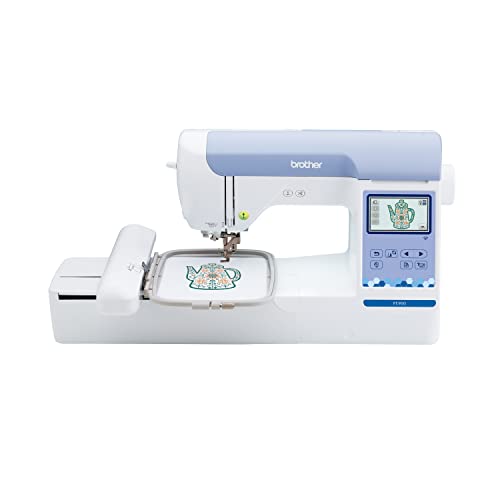
4. Brother PE900 Embroidery Machine with WLAN
Rating: 9.3/10
The Brother PE900 Embroidery Machine with WLAN in white is a fantastic tool for anyone looking to add beautiful custom designs to their projects. This embroidery-only machine lets you create unique patterns with ease, connecting wirelessly to your devices.
What We Like:
- The ARTSPIRIA mobile app is a game-changer. You can access 50 free designs, draw your own patterns on your phone, or download new ones and send them straight to the PE900.
- Wireless LAN makes transferring designs from your computer super simple using the Design Database Transfer software.
- The 5″ x 7″ embroidery field is big enough for most designs, and there’s plenty of room (7.4″ from needle to arm) to work with.
- Advanced Color Sort and Jump Stitch Trimming help your projects stitch faster and cleaner by reducing thread changes and trimming excess threads.
- With 193 built-in designs, including pretty florals and quilt patterns, plus 13 lettering fonts in different languages, you have tons of options right out of the box.
- The 3.7-inch color touchscreen is bright and easy to use. You can edit designs right on the screen, zoom in, resize, rotate, and even combine designs.
What Could Be Improved:
- This machine is for embroidery only; it doesn’t sew like a regular sewing machine.
- It’s designed for use in the US at 120 volts. Using it elsewhere might void the warranty.
The Brother PE900 makes creative embroidery accessible and fun. It’s a great machine for adding that special touch to gifts or personal items.
5. Brother SE700 Combo Embroidery & Sewing Machine with 4″ x 4″ Embroidery Hoop and 40+ Accessories

Rating: 8.8/10
Unleash your creativity with the Brother SE700 Combo Embroidery & Sewing Machine! This fantastic machine is your all-in-one solution for both sewing and stunning embroidery projects. Whether you’re a beginner or looking to expand your crafting skills, the SE700 offers a user-friendly experience packed with features. It comes with a 4″ x 4″ embroidery hoop and over 40 useful accessories to get you started right away.
What We Like:
- It’s a 2-in-1 machine, so you can sew and embroider with one device.
- You get over 40 accessories in the bundle to help you with many projects.
- It has a lot of built-in embroidery designs and sewing stitches, plus more available through the Artspira app.
- Wireless LAN connectivity makes it easy to transfer designs.
- The color touchscreen is bright and simple to navigate.
- Exclusive lifetime product support from Swing Design is included, which is a big plus.
What Could Be Improved:
- The embroidery area is limited to 4″ x 4″, which might be small for larger designs.
- Learning all the features and the Artspira app might take some time for new users.
The Brother SE700 is a versatile and exciting machine for anyone wanting to add custom touches to their sewing and embroidery projects. Get ready to create amazing things!
Choosing Your Perfect Home Embroidery Machine
Embroidery can add a special touch to clothes, blankets, and more. A home embroidery machine makes it easy to create beautiful designs. This guide will help you pick the right one for you.
Key Features to Look For
When you shop for an embroidery machine, keep these features in mind.
Stitch Field Size
This is how big a design the machine can stitch without you moving the fabric. A larger stitch field means you can make bigger, more impressive designs. For beginners, a medium-sized field is usually good.
Built-in Designs and Fonts
Many machines come with pre-loaded designs and letters. This is great for starting right away! More designs and fonts give you more options.
Connectivity Options
Some machines let you connect to your computer or Wi-Fi. This makes it easy to download new designs or send your own creations to the machine. USB ports are common and very useful.
Automatic Threading and Cutting
These features save you time and frustration. Automatic threading puts the thread through the needle for you. Automatic thread cutting trims the thread when a color change is done.
Screen Display
A clear, colorful touchscreen makes it easy to select designs and make adjustments. Some have simple buttons, while others have advanced touch interfaces.
Important Materials and What They Mean
The quality of the machine’s parts matters.
Frame/Hoop Quality
The hoop holds your fabric tight. A sturdy hoop prevents the fabric from shifting, which is important for neat stitches. Good hoops are made of strong plastic or metal.
Needle System
Embroidery machines use special needles. Make sure the machine uses standard, easy-to-find needles.
Internal Mechanics
A well-built machine with good gears and motors will last longer and run smoother. While you can’t always see these, reading reviews can give you clues.
Factors That Improve or Reduce Quality
Several things affect how good your embroidery looks.
Ease of Use
A machine that is easy to set up and operate will make your experience better. If it’s too complicated, you might get discouraged.
Stitch Quality
Look for machines that create clean, even stitches. Sometimes, cheaper machines can have skipped stitches or uneven tension.
Durability
A well-made machine will last a long time. Metal parts often make a machine more durable than all-plastic ones.
Software and Updates
If the machine connects to a computer, check if the software is user-friendly. Also, see if the company provides updates.
User Experience and Use Cases
Who is this machine for, and what can you do with it?
For Beginners
If you’re new to embroidery, look for a machine with lots of built-in designs and easy-to-use features like automatic threading. Simple navigation on the screen is also helpful. You can start by personalizing t-shirts or tote bags.
For Hobbyists
If you enjoy crafting, you might want a machine with more advanced features. This could include a larger stitch field, more fonts, and the ability to download designs from the internet. You can create personalized gifts, home decor items like pillowcases, or even embellish clothing with intricate patterns.
For Small Businesses
If you plan to sell embroidered items, you’ll need a durable machine that can handle frequent use. Look for a larger stitch field, fast stitching speed, and the ability to connect to design software. You can create branded merchandise, custom apparel, and unique craft items for sale.
Frequently Asked Questions (FAQ)
Q: How much do home embroidery machines cost?
A: Prices can range from about $300 for basic models to over $1,000 for advanced machines. The cost depends on the features and brand.
Q: Do I need special thread for embroidery machines?
A: Yes, you usually need embroidery-specific thread. It’s often smoother and stronger than regular sewing thread to prevent breaking.
Q: Can I use my sewing machine for embroidery?
A: Some sewing machines have basic embroidery functions. However, dedicated embroidery machines offer more features and a larger stitch field for better results.
Q: How do I transfer designs to the machine?
A: You can often transfer designs using a USB drive, SD card, or Wi-Fi connection, depending on the machine’s capabilities.
Q: What is “embroidery hoop burn”?
A: This is a slight crease or mark left on fabric from the hoop. It usually disappears after washing.
Q: Is it hard to learn how to use an embroidery machine?
A: Most machines come with instruction manuals and tutorials. Many beginners find them quite easy to learn, especially with user-friendly models.
Q: What kind of fabric can I embroider?
A: You can embroider on many fabrics, including cotton, linen, denim, and some synthetics. Thicker fabrics might need a larger hoop.
Q: How do I maintain my embroidery machine?
A: Regular cleaning, oiling (if recommended by the manufacturer), and checking the needle and thread path will keep your machine running well.
Q: Can I edit designs on the machine?
A: Some machines allow basic editing like resizing, rotating, or changing colors directly on the screen. More complex editing usually requires design software.
Q: What is a “stitch out”?
A: A “stitch out” is the final embroidered design on your fabric. It refers to the completed embroidery project.
In conclusion, every product has unique features and benefits. We hope this review helps you decide if it meets your needs. An informed choice ensures the best experience.
If you have any questions or feedback, please share them in the comments. Your input helps everyone. Thank you for reading.