
Can you digitize a logo for embroidery yourself? Yes, you can, but it requires specialized software and a good eye for detail. Alternatively, you can hire professional embroidery digitizing services to handle the digitizing a logo for embroidery process for you, ensuring a high-quality result. This guide will walk you through the essential steps involved in turning your logo into a stitch file.
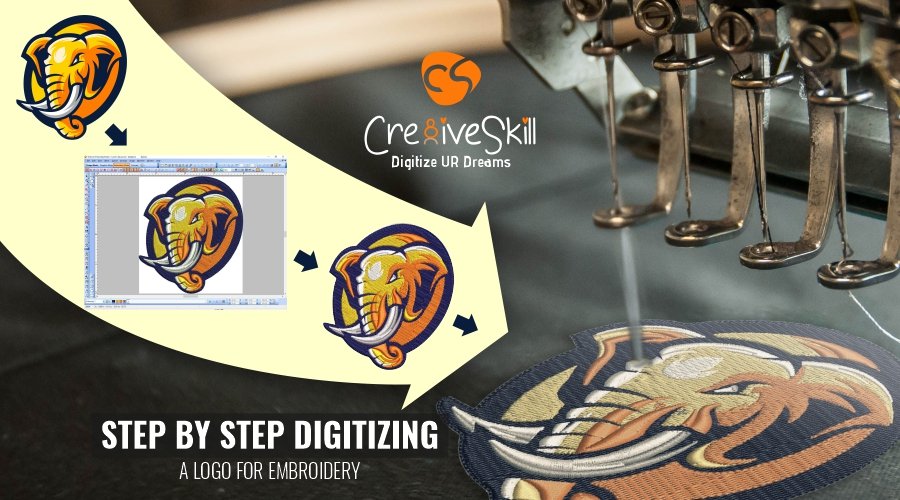
Image Source: www.cre8iveskill.com
Why Digitize Your Logo?
Simply put, machine embroidery and hand embroidery are vastly different. While hand embroidery is about artistic expression and skill with a needle and thread, machine embroidery relies on precise instructions. A logo, often designed with smooth lines and solid colors, needs to be translated into a series of stitches that a machine can follow. This translation process is called digitizing.
From Pixels to Stitches
Your logo, whether it’s a graphic design on your computer or a printed image, exists in a digital format. This format, often a vector file like AI or EPS, or a raster file like JPG or PNG, tells a computer what the logo looks like visually. However, an embroidery machine doesn’t “see” images. It needs to know where to push the needle, what type of stitch to use, how long that stitch should be, and in what direction to move the fabric. Converting logos for embroidery involves taking that visual information and transforming it into a machine-readable code.
The Goal of Digitizing
The primary goal of machine embroidery digitizing is to create an embroidery file that accurately represents the original logo while also being suitable for the embroidery process. This means considering:
- Stitch Type: Different stitches (like satin, fill, or running stitches) create different textures and effects.
- Stitch Direction: This influences how light reflects off the stitches, affecting the overall appearance.
- Stitch Density: The closeness of stitches determines how solid or detailed an area will appear.
- Thread Colors: Matching the logo’s colors accurately with available embroidery threads.
- Underlay: Special stitches placed beneath the main stitches to provide stability and prevent fabric puckering.
Essential Tools for Digitizing
To embark on the journey of custom embroidery digitizing, you’ll need a few key things:
Embroidery Digitizing Software
This is the most crucial tool. There are various software options available, ranging from professional-grade programs to more accessible options. Some popular choices include:
- Wilcom EmbroideryStudio: Considered the industry standard, offering a comprehensive suite of tools for professional digitizers.
- Embird: A powerful and versatile software with modules for digitizing, editing, and managing embroidery designs.
- Hatch Embroidery: Known for its user-friendly interface and robust features, making it suitable for both beginners and experienced users.
- Sew What Pro: A more affordable option that provides essential digitizing capabilities.
When choosing software, consider your budget, experience level, and the types of embroidery projects you plan to undertake.
High-Quality Logo File
The better the source material, the better the final embroidered design. Ideally, you want a vector to embroidery conversion.
- Vector Files (AI, EPS, SVG): These files are created using mathematical equations, meaning they can be scaled to any size without losing quality. They are the preferred format for converting logos for embroidery as they provide clean lines and sharp edges for the digitizer to work with.
- Raster Files (JPG, PNG, BMP): These files are made up of pixels. While usable, they can become pixelated or blurry when enlarged, making the digitizing process more challenging and potentially resulting in a less precise embroidered output. If you only have a raster file, a higher resolution and cleaner image will yield better results.
Knowledge of Embroidery Techniques
While software does the heavy lifting, a good digitizer needs to understand how embroidery works. This includes knowing how different stitch types behave, how thread tension affects the final product, and how fabric types can influence the outcome.
The Digitizing Process: Step-by-Step
Here’s a breakdown of how to digitize a logo for embroidery:
Step 1: Prepare Your Logo File
- Clean Up the Logo: If you’re starting with a raster image, ensure it’s as clean as possible. Remove any unwanted backgrounds, artifacts, or jagged edges. If the logo has text, ensure it’s legible at the intended embroidery size.
- Determine the Final Size: Decide on the exact dimensions the logo will be embroidered at. This is critical because a logo that looks great at 4 inches wide might become too dense or lose detail at 1 inch, and vice-versa.
- Color Separation: Identify the distinct colors in your logo. These will correspond to the different thread colors you’ll use. Keep the color palette simple for the best embroidery results. Too many colors can lead to excessive thread changes and a less cohesive design.
Step 2: Import the Logo into Digitizing Software
Open your chosen embroidery digitizing software and import your cleaned-up logo file. Most software allows you to import various image formats.
Step 3: Trace and Outline the Logo Elements
This is where the actual digitizing begins. You’ll use the software’s tools to trace the shapes and lines of your logo.
- Using the Pencil/Pen Tool: Many digitizers meticulously trace each element of the logo by hand using the software’s drawing tools. This allows for precise control over stitch placement and direction.
- Auto-Trace Features: Some software offers auto-trace features that can convert raster images into vector outlines. However, these often require significant manual cleanup and refinement to produce professional-quality embroidery files. It’s rare to go directly from vector to embroidery without some manual adjustment.
Step 4: Select and Apply Stitch Types
For each element you’ve traced, you need to select the appropriate stitch type.
- Satin Stitches: Used for outlines, lettering, and small, solid areas. They create a smooth, raised effect. The digitizer controls the stitch length and angle to create this effect.
- Fill Stitches: Used for larger solid areas. These can include various patterns like tatami, satin fills, or complex fills. The density and direction of these stitches are crucial.
- Running Stitches: Simple stitches used for fine details, outlines that need a lighter touch, or as underlay.
A good embroidery pattern creation involves strategically using these stitch types to achieve the desired look and feel.
Step 5: Define Stitch Direction and Angles
The direction of stitches significantly impacts how the embroidered design looks.
- Satin Stitch Angles: For satin stitches, setting the correct angle is vital to create smooth transitions and capture highlights. For example, on curved letters, the satin stitch angles will often follow the curve.
- Fill Stitch Direction: For fill stitches, the directionality can create visual texture and directionality within a solid area, making it appear more dynamic.
Step 6: Set Stitch Density and Underlay
- Stitch Density: This refers to how close together the stitches are. Too dense, and the fabric might pucker or the needle might break. Too sparse, and the fabric underneath will show through. Digitizing software allows you to set stitch density based on the stitch type and fabric.
- Underlay Stitches: These are essential for a clean and professional embroidered finish.
- Edge Run: A single line of running stitch along the edge of a shape to prevent fraying.
- Center Run: A running stitch down the middle of a satin stitch area to provide a base for the satin stitches to lay on.
- Fill Underlay: A light fill stitch that provides a base for the main fill stitches, preventing the fabric from showing through and reducing puckering.
Step 7: Add Details and Refinements
- Trim Commands: The software needs to be instructed when to trim the thread between color changes or stops in the design.
- Stitch Smoothing: Most software has tools to automatically smooth out jagged stitch lines, especially on curves.
- Compensation: This is a technique to account for the pull of the fabric and the stitches. For example, satin stitches might need to be slightly longer on the edges where they pull away from the center. This is a key aspect of professional embroidery digitizing.
Step 8: Save in Appropriate Embroidery File Formats
Once your design is digitized, you need to save it in a format that your embroidery machine can read. Common embroidery file formats include:
| File Format | Common Usage | Notes |
|---|---|---|
| .DST | Tajima, Melco, many other commercial machines | A widely compatible format, but it doesn’t store color information or stitch order for specific machines. |
| .PES | Brother, Babylock, Simplicity | Stores color information and is widely used for home embroidery machines. |
| .JEF | Janome, Elna, Kenmore | Another popular format for home embroidery machines, also stores color information. |
| .EXP | Melco, commercial machines | Often used for Melco machines and can store more machine-specific data. |
| .HUS | Husqvarna Viking, Pfaff, Singer | Popular for Viking and Pfaff machines. |
| .SEW | Janome (older models) | Older format primarily for Janome machines. |
| .VP3 | Pfaff, Husqvarna Viking (newer models) | Newer format for Pfaff and Viking machines, often storing more design parameters. |
| .XXX | Singer (some commercial and home machines) | Used by some Singer machines. |
Always check your embroidery machine’s manual to determine which file formats it supports. You might need to convert your design to a different format using your digitizing software or a dedicated converter. The process of logo to stitch file conversion is complete when you have a file ready for your machine.
When to Use Professional Embroidery Digitizing Services
While you can learn to digitize yourself, it’s a skill that takes time and practice to master. For many businesses and individuals, outsourcing is the more practical and efficient solution.
Benefits of Professional Services
- Expertise: Professional digitizers have years of experience and deep knowledge of software, stitch types, and fabric behavior. They know how to achieve the best results for various designs and materials.
- Time Savings: Digitizing a complex logo can take several hours for a beginner. Professionals can complete the task much faster.
- Quality Assurance: They ensure your logo is digitized correctly, with clean stitches, accurate color representation, and optimal density, preventing common embroidery issues like puckering or thread breaks.
- Cost-Effectiveness: For occasional projects, hiring a service is often more cost-effective than investing in expensive software and learning the skill.
- File Format Conversion: They can provide the design in any embroidery file format you require.
How to Choose a Digitizing Service
- Portfolio Review: Look at examples of their previous work. Does their style match what you’re looking for?
- Customer Reviews: Check testimonials or online reviews to gauge customer satisfaction.
- Turnaround Time: Inquire about their typical turnaround time for projects.
- Pricing: Get quotes and compare prices, but remember that the cheapest option isn’t always the best. Focus on value and quality.
- Communication: Ensure they are responsive and willing to answer your questions.
When you submit your logo to a service, provide them with the highest quality file you have and clear instructions regarding the desired size, placement, and any specific requirements. They will then handle the entire logo to stitch file conversion process for you.
Common Challenges in Digitizing
Even with the best software, digitizing can present challenges:
Fine Details and Small Text
Logos with very small text or intricate details can be difficult to translate into embroidery. Stitches have a minimum length, and tiny elements might become blurred or unreadable. Digitizers often have to simplify or enlarge these areas to make them embroiderable.
Gradients and Shading
While fill stitches can create shading effects, smooth gradients from one color to another are challenging in embroidery. Digitizers typically use dithering techniques (placing stitches in a pattern to simulate color blending) or break down gradients into distinct color blocks.
Jagged Edges and Curves
When converting raster images or even complex vector shapes, jagged edges can occur. The digitizer must carefully smooth these out using satin stitch angles and stitch smoothing tools.
Fabric Choice and Stability
The type of fabric being embroidered significantly impacts the digitizing process. Stretchy fabrics require different underlay and stitch densities than stable woven fabrics. A skilled digitizer will account for this when creating the embroidery pattern creation.
Color Matching
Translating digital colors to physical embroidery threads requires careful selection. While software can suggest thread colors, the final match often depends on the digitizer’s experience and the available thread palette.
Tips for a Successful Digitized Logo
- Keep it Simple: Complex logos with many small details or gradients are harder to digitize and may not embroider well. Consider simplifying your logo for embroidery.
- Use Vector Files When Possible: This makes the tracing process much cleaner and more accurate.
- Specify the Exact Size: Always provide the final dimensions for the embroidery.
- Provide a Color Reference: If precise color matching is important, provide a Pantone or CMYK color reference, but understand that thread colors may not be an exact match.
- Test Your Designs: If you’re digitizing yourself, always test your designs on a piece of scrap fabric before committing to a final product.
Conclusion
Digitizing a logo for embroidery is a technical process that bridges the gap between graphic design and textile art. It transforms a visual representation into a set of machine instructions that create a physical embroidered product. Whether you choose to master the skill yourself or rely on professional embroidery digitizing services, the goal remains the same: to achieve a high-quality, visually appealing embroidered representation of your brand or design. By following these steps and paying attention to the details, you can successfully convert your logo to stitch file and bring your designs to life on fabric. Remember that custom embroidery digitizing is an art as much as it is a science, and the quality of the digitized file will directly impact the final embroidered outcome.