

Imagine transforming a plain t-shirt into a dazzling work of art with just the press of a button. Or picture yourself creating personalized gifts that truly wow your friends and family. This is the magic of machine embroidery, and it’s more accessible than you might think!
But let’s be honest, diving into the world of machine embroidery can feel a little overwhelming. So many machines, so many stitches, so many things to learn! It’s easy to get lost trying to figure out which machine is best for your needs and budget. You want to start creating beautiful embroidered items, but the sheer number of choices can make your head spin.
That’s where we come in! This post is designed to cut through the confusion. We’ll guide you through the essential features to look for, explain what all those technical terms mean, and help you find a machine that will spark your creativity. By the end, you’ll feel confident and ready to start your own embroidery adventures.
Our Top 5 Machine Embroidery Recommendations at a Glance
Top 5 Machine Embroidery Detailed Reviews
1. Brother SE700 Sewing and Embroidery Machine

Rating: 8.9/10
Unleash your creativity with the Brother SE700 Sewing and Embroidery Machine. This versatile white machine is your all-in-one solution for both sewing and embroidery projects. It’s designed to make starting your crafting journey easy and fun, packed with features that help you create beautiful items.
What We Like:
- It combines sewing and embroidery, so you can do more with one machine.
- You can send embroidery designs wirelessly from your computer or phone.
- The ArtsPira mobile app lets you draw your own designs or pick from a collection.
- It has a good-sized 4″ x 4″ embroidery area for many projects.
- The 3.7-inch color touchscreen is bright and easy to use for editing designs.
- You get 135 built-in designs and 10 embroidery fonts to get started.
- There are 103 sewing stitches and 10 types of buttonholes for all your sewing needs.
- The automatic needle threader makes threading the needle super simple.
- A jam-resistant drop-in top bobbin makes bobbin changes quick and easy.
- It comes with 8 different sewing feet to handle various tasks.
What Could Be Improved:
- The embroidery field is limited to 4″ x 4″, which might be small for larger designs.
- This model is only sold in the US and operates at 120 volts, so check compatibility if you are elsewhere.
The Brother SE700 is a fantastic choice for anyone wanting to dive into sewing and embroidery. Its smart features and included accessories make it a great value for starting your creative adventures.
2. POOLIN EOC06 Embroidery Machine

Rating: 8.7/10
Unleash your creativity with the POOLIN EOC06 Embroidery Machine! This user-friendly machine is packed with features to help beginners dive into the exciting world of embroidery. It boasts a large touchscreen, a generous embroidery area, and tons of built-in designs, making it perfect for personal projects or even starting a small business. The included software and accessories mean you can start stitching right out of the box.
What We Like:
- Large 7.9×11 inch embroidery area accommodates big projects.
- Intuitive 7-inch color touchscreen feels like using a smartphone.
- Comes with 4 hoops, 200 designs, 8 fonts, and essential supplies to get you started immediately.
- Wireless and USB connectivity offer flexible ways to transfer your designs.
- Included Institch i3 computer system and Doodle Digitizing software are beginner-friendly.
- Excellent social media support and free one-to-one engineer assistance are available.
- Automatic needle threader and thread trimmer save time and effort.
What Could Be Improved:
- For thicker fabrics, a different needle might be needed.
- Requires separate embroidery design software to create your own patterns.
The POOLIN EOC06 is a fantastic choice for anyone looking to start their embroidery journey. Its comprehensive package and supportive community make learning and creating enjoyable.
3. Smartstitch S-1001 Upgraded Embroidery Machine with 10 Needles

Rating: 8.8/10
The Smartstitch S-1001 is a powerful, upgraded embroidery machine designed for serious crafters and small businesses. This new generation commercial machine packs impressive features into a compact and lightweight design. It boasts a precise operating system, auto thread trimming, and auto color changing to make your projects run smoothly. With a generous 9.5″x14.2″ embroidery area and a maximum speed of 1200 stitches per minute, you can tackle large and complex designs with ease. The 7″ touch screen makes operation intuitive, and the laser embroidery positioning helps you place your designs perfectly every time. This machine is built for versatility, handling everything from flat fabrics to hats and t-shirts.
What We Like:
- Precise operating system for professional results.
- Auto thread trimming and auto color changing save time and effort.
- Thread break detection prevents mistakes and wasted thread.
- Newly-added physical buttons offer convenient control.
- Laser embroidery positioning ensures accurate placement.
- Less noise and a more stable structure for a better user experience.
- Easier maintenance keeps your machine running smoothly.
- Max 100 million stitches memory is incredibly vast.
- Friendly learning curve with an active online community and excellent support.
- Completed training and technical support are readily available.
- Full embroidery application with a starter pack included.
- Versatile for flat items, hats, t-shirts, and more.
What Could Be Improved:
- The return policy requires keeping all original packaging intact for a specific period, which can be a bit cumbersome.
The Smartstitch S-1001 is a fantastic choice for anyone looking to elevate their embroidery game. Its advanced features and strong support system make it a reliable and user-friendly option.
4. Brother PE545 Embroidery Machine
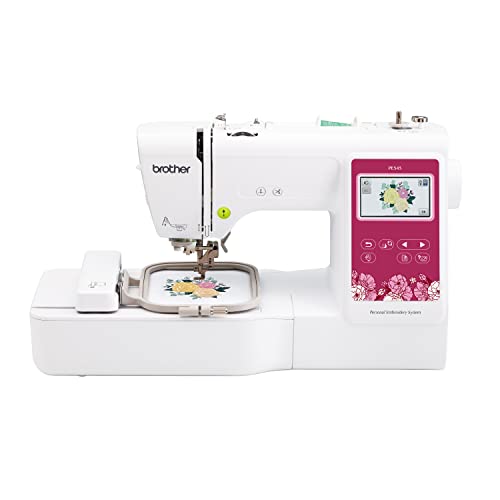
Rating: 9.4/10
The Brother PE545 Embroidery Machine is a fantastic tool for anyone looking to add a personal touch to fabrics. It’s an embroidery-only machine, meaning it focuses solely on creating beautiful embroidered designs. With its wireless connectivity and user-friendly touchscreen, it makes customizing clothes, bags, and more a breeze.
What We Like:
- It has Wireless LAN, so you can send designs from your computer easily.
- The free Design Database Transfer software helps you manage your designs.
- You can even draw your own patterns on your phone with the Artspira mobile app!
- It comes with a 4″ x 4″ embroidery hoop, perfect for many projects.
- The big 3.7-inch LCD color touchscreen makes it simple to see and adjust your designs.
- You can drag and drop designs, make changes, and even watch tutorials right on the screen.
- It includes 135 built-in designs, like fun kid patterns, holiday themes, and pretty flowers.
- You also get 10 font styles to add names or special messages.
- It includes useful accessories like needles, bobbins, and a seam ripper.
What Could Be Improved:
- This machine is only for embroidery; it doesn’t sew regular stitches.
- It’s designed for use only in the US with 120 volts, so it won’t work in other countries.
The Brother PE545 is a great choice for beginners and hobbyists wanting to explore the world of embroidery. Its smart features and included designs offer endless creative possibilities.
5. Smartstitch S-1501 Commercial Embroidery Machine with 15 Needles

Rating: 9.0/10
The Smartstitch S-1501 Commercial Embroidery Machine is your ultimate partner for launching a successful embroidery business. This powerhouse machine boasts 15 needles, a generous 14″x20″ embroidery area, and a swift 1200SPM max speed. Its intuitive 12″ touchscreen and available Wi-Fi connectivity make design management a breeze. Plus, it’s built to handle a wide range of projects, from trendy 3D caps and flat items to t-shirts and much more.
What We Like:
- It’s the best machine to start your embroidery business with its impressive features.
- The machine has a friendly learning curve, thanks to a supportive online community and an easy-to-use 12″ touchscreen.
- You can schedule a live demo to see the machine in action before you buy, making a big purchase decision easier.
- Smartstitch provides excellent training and technical support, including online help and local assistance, so you’re never alone.
- It offers full embroidery application capabilities, handling denim, leather, caps, shoes, and bags with its starter pack.
- The 270-degree wide-angle cap system is a big plus for cap embroidery.
- Laser positioning helps ensure your designs are perfectly placed every time.
- Automatic color change speeds up your workflow significantly.
- The smart control system makes operation smooth and efficient.
What Could Be Improved:
- The return process requires careful packing and documentation, so keep all original materials for a while.
This machine is a fantastic investment for anyone looking to start or expand their embroidery venture. It offers professional results with user-friendly features, backed by great support.
The Ultimate Buying Guide: Your Machine Embroidery Adventure Awaits!
Ready to add some sparkle and flair to your fabrics? Machine embroidery opens up a world of creativity, letting you stitch beautiful designs onto clothes, home décor, and more. But with so many options, where do you start? This guide will help you find the perfect machine for your stitching dreams.
1. Key Features to Look For
When you’re shopping for a machine embroidery machine, several features make a big difference.
A. Hoop Size
The hoop is what holds your fabric. A larger hoop lets you stitch bigger designs without re-hooping. Look for machines with various hoop sizes to handle different projects. Some machines even come with extra-large hoops.
B. Stitch Speed
This is how fast the machine stitches. Higher stitch speeds mean quicker projects. However, sometimes a slower speed gives you more control for intricate designs.
C. Built-in Designs and Fonts
Many machines come with pre-loaded designs and lettering. This is great for beginners! The more options you have, the more you can create right away.
D. Connectivity Options
How do you get designs into your machine? USB ports are common. Some machines connect wirelessly to your computer or tablet, making design transfer super easy.
E. Editing Features
Can you change designs on the machine itself? Features like resizing, rotating, and combining designs are very handy. This saves you from needing extra software for simple edits.
2. Important Materials
You’ll need more than just the machine to start embroidering.
- Embroidery Thread: This thread is stronger and shinier than regular sewing thread. It comes in many colors and materials like polyester and rayon.
- Stabilizers: These are like a backing for your fabric. They prevent stitches from sinking into the fabric or stretching it out. There are different types for different fabrics.
- Hoops: You need hoops that fit your machine. They come in various sizes.
- Needles: Special embroidery needles are designed for machine embroidery. They have a larger eye for the thicker thread.
- Fabric: Most fabrics work, but some are better than others. Cotton, denim, and felt are good starting points.
3. Factors That Improve or Reduce Quality
A few things can make your embroidery look amazing or a bit messy.
A. Tension Control
Proper tension is key! If the tension is too tight, your stitches might look pulled or even break. If it’s too loose, the stitches can look messy and gappy. Most good machines have adjustable tension.
B. Needle Choice
Using the right needle for your fabric and thread makes a huge difference. A dull or incorrect needle can snag your fabric or thread, leading to poor stitch quality.
C. Stabilizer Use
Skipping stabilizer or using the wrong kind is a common mistake. It can cause puckering, stretching, or designs that don’t lay flat. Always use a stabilizer that matches your fabric and design.
D. Design Complexity
While machines can stitch complex designs, very dense or intricate patterns might require more advanced features or careful setup to look their best.
4. User Experience and Use Cases
Machine embroidery is fun and can be used for many things!
A. Ease of Use
For beginners, a machine with a clear screen, intuitive controls, and helpful guides is best. Some machines have tutorials built-in.
B. Learning Curve
While machines do the stitching, you still need to learn how to set up your projects, choose designs, and manage your materials. Practice makes perfect!
C. Use Cases
- Personalizing Gifts: Add names or special messages to towels, blankets, or t-shirts.
- Customizing Apparel: Create unique designs for jackets, hats, or bags.
- Home Décor: Embellish pillows, curtains, or table runners.
- Craft Projects: Add decorative elements to quilts, patches, or even stuffed animals.
Frequently Asked Questions (FAQ)
Q1: What is machine embroidery?
A1: Machine embroidery is a way to stitch designs onto fabric using a special sewing machine. It’s like drawing with thread!
Q2: Do I need a special sewing machine for embroidery?
A2: Yes, you need a machine specifically designed for embroidery or a combination sewing and embroidery machine.
Q3: Is machine embroidery difficult to learn?
A3: It takes some practice, but many machines are designed to be user-friendly, especially for beginners. You’ll learn as you go!
Q4: What kind of thread should I use for machine embroidery?
A4: You should use embroidery thread. It’s stronger and has a nice sheen compared to regular sewing thread.
Q5: What is a stabilizer, and why do I need it?
A5: A stabilizer is like a temporary backing for your fabric. It keeps your fabric stable so the stitches look neat and don’t distort the fabric.
Q6: Can I use any fabric for machine embroidery?
A6: Most fabrics work, but cotton, denim, and felt are usually good choices for starting out. Very stretchy or delicate fabrics can be trickier.
Q7: How do I get designs into my embroidery machine?
A7: You can usually transfer designs using a USB drive. Some newer machines can also connect wirelessly to computers or tablets.
Q8: What does “hoop size” mean?
A8: The hoop size tells you the maximum area your machine can stitch a design in one go. Bigger hoops let you stitch larger designs.
Q9: Can I edit designs on the embroidery machine?
A9: Many machines allow you to resize, rotate, and combine designs directly on the machine’s screen. This is a very useful feature.
Q10: What are some common projects for machine embroidery?
A10: You can personalize gifts, create custom clothing, decorate home items, and add flair to many craft projects.
In conclusion, every product has unique features and benefits. We hope this review helps you decide if it meets your needs. An informed choice ensures the best experience.
If you have any questions or feedback, please share them in the comments. Your input helps everyone. Thank you for reading.