
Is your sewing machine giving you trouble? Sewing should be fun, not frustrating. When your machine stops sewing right, there are a few main things that are usually the cause. Most times, the problem is simple. It could be the way the thread is put in, the needle, or a bit of lint. This guide will walk you through fixing common problems. It will cover sewing machine troubleshooting steps to get you back to sewing smoothly.
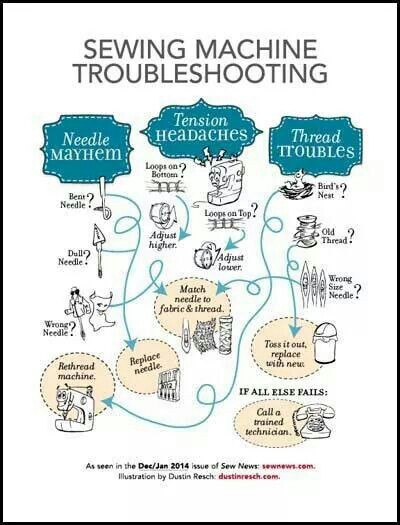
Image Source: bestfabricstore.com
First Steps for When Your Machine Stops
When your machine just won’t sew, don’t panic. Take a deep breath. Most problems have easy fixes. Start with the simplest things first. Checking the thread, the needle, and the bobbin area often solves the issue.
Checking the Basics: Thread and Needle
Often, the reason your machine isn’t sewing correctly is because of the thread or the needle. These are the easiest things to check first.
Checking the Thread Path
One of the most common reasons for problems like thread breaking or skipping stitches is the thread path. If the thread isn’t put through the machine just right, it won’t sew.
Rethreading Your Machine
This is key. How you rethread sewing machine is super important. Make sure you do it exactly as your machine’s guide shows. Even small mistakes can cause big problems.
- Lift the presser foot before you start rethreading. This opens the tension discs, letting the thread sit in them right. If the foot is down, the thread won’t go into the discs properly, causing tension problems.
- Take out all the old thread, both from the top and the bobbin.
- Put in a fresh spool of thread.
- Follow the numbered path on your machine carefully. Make sure the thread goes through every guide and hook.
- Make sure the thread goes into the tension discs correctly.
- Thread the needle from the front to the back.
- Pull the bobbin thread up through the needle plate hole. Hold the top thread and turn the handwheel to bring the bobbin thread up.
Picking the Right Thread
Believe it or not, the thread itself matters. Using old, weak, or poor-quality thread can lead to thread breaking. Make sure your thread is made for sewing machines. Keep it in a cool, dry place.
Checking the Needle
The needle is the part that actually goes through the fabric to make the stitch. If the needle is bent, dull, or wrong for the job, it will cause problems.
How Needles Cause Trouble
A bad needle is a top reason for skipping stitches and thread breaking.
- Bent Needle: If the needle is bent, even a little, it won’t go down straight. This can make it hit the bobbin case or the needle plate, causing loud noises, breaking, or simply not forming a stitch right.
- Dull Needle: Over time, needles get dull. A dull needle pushes fabric fibers instead of piercing them cleanly. This can lead to skipped stitches and damage to the fabric.
- Wrong Needle: Needles are made for different fabrics. Using a universal needle on stretchy knit fabric can cause skips. Using a sharp needle on knit might make holes. Make sure you use the right type and size for your fabric.
- Wrongly Inserted Needle: Needles must be put in the right way. Most sewing machine needles have a flat side at the top. This flat side usually faces the back of the machine. If it’s turned wrong, the machine can’t pick up the bobbin thread, and it won’t sew.
How to Check and Change Your Needle
Checking your needle is simple. Take it out and lay it on a flat surface. If you can see any gap under the shaft, it’s bent. Always put in a new needle when you start a big project or every 8-10 hours of sewing.
- Turn off your machine.
- Loosen the needle clamp screw (often a little knob or screw near the needle).
- Pull the old needle down and out.
- Insert the new needle with the flat side facing the back (or as your manual says). Push it up as far as it will go.
- Tighten the needle clamp screw.
- Give the handwheel a turn by hand slowly to make sure the needle goes up and down smoothly and doesn’t hit anything.
Problems with the Bobbin
The bobbin holds the bottom thread. Issues here are major causes of thread knotting on the bottom of your fabric, bobbin jamming, or the machine not sewing at all.
What Goes Wrong with Bobbins?
- Bobbin Put in Wrong: Bobbins need to go in a specific way. Some drop-in bobbins spin clockwise, others counterclockwise. Check your machine’s guide. If it’s spinning the wrong way, the stitches won’t form.
- Bobbin Thread Wound Unevenly: If the thread is wound too loose, too tight, or lumpy on the bobbin, it won’t come off smoothly. This causes bad stitches or jams.
- Wrong Bobbin: Not all bobbins are the same, even if they look alike. Using a bobbin from a different brand or machine type can cause problems with fit and thread flow. Always use the bobbins that came with your machine or ones that your machine’s guide says are okay.
- Lint and Thread Bits: The bobbin case and the area around it can get full of lint and bits of thread. This can block the thread, mess up the tension, or cause bobbin jamming.
Fixing Bobbin Issues
Winding a Bobbin Right
Always wind bobbins on the machine’s bobbin winder. Make sure the thread goes through any guides needed before winding. Wind it at a steady speed. It should look smooth and even, not lumpy. Don’t overfill it.
Putting the Bobbin in Right
Follow your manual exactly. For front-loading bobbins, make sure the bobbin case is inserted fully and clicks into place. For top-loading (drop-in) bobbins, make sure the thread tail is coming off the bobbin in the correct direction as shown by the arrows on the machine.
Cleaning the Bobbin Area
This is a must for good sewing machine troubleshooting.
- Turn off your machine.
- Take out the needle, the presser foot, and the bobbin.
- Remove the needle plate (you might need a screwdriver).
- Use a small brush (often comes with the machine) or a mini vacuum cleaner meant for sewing machines to remove all the lint and thread bits you can see. Pay close attention to the bob feed dogs (the little teeth that move the fabric), the bobbin case area, and around the hook.
- Do not use canned air. It can blow lint deeper into the machine parts, causing more problems later.
- Once clean, put the needle plate, bobbin, presser foot, and needle back.
Dealing with Thread Tension
Tension problems are when the top thread and bobbin thread don’t link together correctly within the fabric layers. This can make stitches look loose, loopy, or cause thread knotting either on top or, more often, on the bottom of your fabric.
What is Thread Tension?
Tension is the amount of pull on the thread as it goes through the machine. The machine has tension controls for both the top thread and the bobbin thread. They need to be balanced for a good stitch.
- Top Tension: Controlled by a dial or setting on the front of the machine. It controls how freely the top thread pulls off the spool and through the machine.
- Bobbin Tension: This is usually set on the bobbin case itself (for front-load machines) or is part of the machine’s design and less often adjusted by the user (for top-load machines). It controls the pull on the bobbin thread.
Signs of Tension Problems
- Loops on Top: Top tension is too tight or bobbin tension is too loose. The bobbin thread is pulling the top thread to the underside of the fabric.
- Loops on Bottom: Top tension is too loose or bobbin tension is too tight. The top thread is pulling the bobbin thread to the top side of the fabric. This is very common and looks like messy loops on the back (bottom) of your sewing. This is classic thread knotting on the underside.
- Uneven Stitches: Tension is not consistent.
Fixing Tension
Check the Easy Stuff First
Before changing tension settings, rethread your machine completely (top and bobbin). Make sure the thread is seated correctly in the tension discs (remember the raised presser foot!). Make sure your bobbin is wound correctly and inserted right. Check for lint in the tension discs or the bobbin area. Often, simply cleaning and rethreading fixes tension issues.
Adjusting Top Tension
Sew a test seam on a scrap of your fabric. Look at the stitches.
- If loops are on the bottom (top tension is too loose): Turn the top tension dial to a higher number (tighten the tension).
- If loops are on the top (top tension is too tight): Turn the top tension dial to a lower number (loosen the tension).
Make small changes, test again, and adjust until the stitch looks the same on both sides – the two threads should meet neatly within the layers of fabric.
Adjusting Bobbin Tension
- Front-Load Machines: The bobbin case has a small screw. Tightening it increases bobbin tension; loosening it decreases it. This is tricky. Mark the screw’s starting position with a pen before you adjust so you can go back. Only make tiny turns (like a quarter turn). It’s often better to try fixing top tension first, as bobbin tension rarely needs changing unless the bobbin case is damaged.
- Top-Load Machines: Bobbin tension is usually not adjustable by the user. If you suspect bobbin tension issues with a top-load machine after checking everything else, it might need a service person.
Fabric Feeding Issues
Fabric feeding issues happen when the fabric doesn’t move smoothly under the needle. The feed dogs (those little teeth under the presser foot) are supposed to pull the fabric along. If they don’t work right, you get bunched-up stitches, stitches that are too long or too short, or the fabric just stays in place.
What Causes Feeding Problems?
- Feed Dogs Turned Off: Most machines have a way to drop the feed dogs (for free-motion sewing or darning). Make sure they are up for regular sewing. There’s usually a switch or button on the machine.
- Presser Foot Not Down: The presser foot needs to be down to hold the fabric against the feed dogs. If the foot is up, the fabric won’t move.
- Wrong Presser Foot: Using the wrong type of presser foot can interfere with fabric movement. Use the standard presser foot for basic sewing.
- Lint and Grime: As mentioned before, lint buildup under the needle plate can block the feed dogs.
- Stitch Length Set to Zero: If the stitch length is set to zero, the feed dogs won’t move the fabric forward.
- Fabric Type: Very thin, sticky, or bulky fabrics can be hard to feed. Sometimes you need a special foot (like a walking foot) or stabilizer.
Fixing Fabric Feeding
- Check Feed Dog Position: Find the switch or button for the feed dogs and make sure they are in the “up” position for normal sewing.
- Lower Presser Foot: Sounds simple, but easy to forget! Always lower the presser foot before starting to sew.
- Check Stitch Length: Make sure your stitch length is set to a number greater than zero (usually 2-3 for typical seams).
- Clean Under the Needle Plate: Remove the needle plate and clean out all the lint and thread bits around the feed dogs and the hook area.
- Use the Right Foot: Ensure you are using the standard or correct presser foot for your sewing task.
- Help the Fabric (Carefully): For difficult fabrics, gently guide the fabric, but do not push or pull hard. Pushing can bend the needle and mess up the stitch. Using a walking foot can help move multiple layers or tricky fabrics evenly.
When Stitches Go Wrong: Skipping and Knotting
We’ve touched on these, but let’s look at them specifically. Skipping stitches means the machine makes a stitch, then skips a spot, then makes another. Thread knotting (often called “bird’s nesting”) is when you get a big mess of thread, usually on the bottom of the fabric.
Why Stitches Skip
Skipping stitches happens when the top thread and bobbin thread don’t loop together correctly under the fabric.
- Bad Needle: This is the top cause. Bent, dull, or wrong-type needles (especially on knits or stretchy fabrics) are prime offenders. Change the needle!
- Machine Not Threaded Right: The timing of the thread loop is off if the thread isn’t seated properly in tension discs or goes through all the guides. Rethread sewing machine carefully.
- Wrong Thread: Poor quality or specialty threads (like metallic) can sometimes be hard for a machine to handle, leading to skips.
- Fabric or Technique: Sewing over very thick seams or trying to sew very tricky fabrics without the right needle or settings can cause skips.
Why Thread Knots (Bird’s Nesting)
This is almost always a top tension or threading issue, causing loose top thread to get pulled into the bobbin area.
- Top Tension Too Loose: The most common reason. The top thread is too slack.
- Presser Foot Up: If you sew with the presser foot up, there is no tension on the top thread at all. It feeds freely and creates a huge knot underneath. Always check the presser foot!
- Thread Not in Take-Up Lever: The take-up lever (the part that moves up and down as you sew) pulls up the slack thread. If the thread isn’t through it, you get loops and knots. Make sure you thread through this lever.
- Lint or Thread in Bobbin Area: Can interfere with bobbin thread movement, making the top thread loop uncontrollably. Causes bobbin jamming and knotting.
- Bad Bobbin Winding/Insertion: As mentioned before, bobbin issues can cause tension problems that lead to knotting.
Fixing Skipping and Knotting
- Always Rethread: When you have skipping or knotting, the very first step after checking the needle is to rethread sewing machine completely, both top and bobbin. Make sure the presser foot is up when threading the top.
- Change the Needle: Put in a brand new, correct-type needle.
- Check Presser Foot: Make sure it’s down when sewing.
- Check Tension: Adjust top tension (increase it slightly for knotting on the bottom). Sew a test piece after each small adjustment.
- Clean: Clean the bobbin area and check the upper tension discs for lint (though cleaning upper discs is harder for users).
Comprehensive Sewing Machine Cleaning
A major part of good sewing machine troubleshooting is keeping your machine clean. Lint, dust, and bits of thread get everywhere inside. This buildup causes problems with tension, feeding, stitch quality, and can even lead to parts seizing up.
Why Cleaning is Important
- Maintains Stitch Quality: Lint interferes with thread movement and bobbin rotation, leading to uneven stitches, skips, and knots.
- Prevents Jams: Buildup in the bobbin area is a top cause of bobbin jamming.
- Ensures Proper Feeding: Lint around feed dogs stops them from grabbing fabric.
- Extends Machine Life: Regular cleaning and oiling (check your manual if your machine needs oiling and where) keep the machine running smoothly and prevent wear and tear.
How to Clean Your Machine
- Gather Supplies: Small brush (usually included), small screwdriver, lint-free cloth, perhaps mini vacuum or tweezers. Check your manual for recommended oil if needed.
- Turn Off and Unplug: Safety first!
- Remove Parts: Take off the needle, presser foot, needle plate, and bobbin/bobbin case.
- Brush Away Lint: Use the brush to remove all visible lint from the feed dogs, the bobbin area, the hook race (where the bobbin case sits or the hook spins), and any other accessible areas. Be thorough.
- Use Tweezers for Stuck Bits: For stubborn lint or thread bits, use tweezers.
- Avoid Canned Air: It pushes lint into hard-to-reach places.
- Wipe Down: Use a soft, dry cloth to wipe down the exterior of the machine.
- Oil (If Your Machine Needs It): Check your manual! Not all machines need oiling, especially newer electronic ones. If yours does, the manual will show you exactly where and how much oil to use (usually just a tiny drop in specific spots after cleaning). Use only sewing machine oil.
- Reassemble: Put all parts back correctly.
- Test: Sew on a scrap fabric first to make sure everything works and to soak up any excess oil.
Cleaning Frequency
How often to clean depends on how much you sew.
- After Every Project: A quick brush of the bobbin area and feed dogs is a good habit.
- Every 8-10 Hours of Sewing: Do a more thorough clean as described above.
- Before and After Storing: Clean your machine before putting it away and before using it after it’s been stored for a while.
Other Potential Issues
If you’ve checked the thread, needle, bobbin, tension, and cleaned the machine, and it’s still not sewing right, here are a few other things to consider in your sewing machine troubleshooting.
Machine is Noisy
- Lint: Often caused by buildup, especially in the bobbin area. Clean it.
- Needs Oiling: If your manual says to oil your machine, maybe it’s time.
- Something is Stuck: A piece of thread or lint could be caught somewhere it shouldn’t be. A good clean might help.
- Bent Needle: Can cause a knocking sound as it hits parts. Change the needle.
- Serious Issue: If it’s a loud grinding or clanking, stop immediately. Something might be broken or seriously jammed. Don’t force it.
Machine is Jammed Solid
If the handwheel won’t turn at all, or only moves a tiny bit:
- Thread Jam: Often caused by a bobbin jamming or a big knot (thread knotting) of thread somewhere in the hook area.
- Unplug the machine.
- Remove the needle, presser foot, needle plate, and bobbin case/bobbin.
- Carefully look for any trapped threads, especially around the bobbin hook. Use tweezers to pull them out. Cut any threads if needed.
- Clean out all lint.
- Try turning the handwheel slowly by hand after removing visible jams. Do not force it.
- If it frees up, reassemble and test on scrap fabric.
- Mechanical Jam: If there’s no visible thread jam, something mechanical might be stuck or broken. Don’t try to force the machine. This needs professional service.
No Stitch Being Formed
You see the needle go up and down, fabric might feed, but no stitch appears.
- Needle Problem: Wrong way, wrong size, bent, or dull. Change it.
- Machine Not Threaded Right: The take-up lever or tension discs are missed. Rethread sewing machine completely.
- Bobbin Problem: Bobbin empty, wrong bobbin, bobbin thread not pulled up, or bobbin case not inserted correctly. Check and fix the bobbin.
- Serious Timing Issue: The needle’s movement isn’t matched correctly with the hook that catches the bobbin thread. This is a mechanical issue and needs professional help.
Stitch is Uneven or Loose
- Tension Problems: This is the most likely cause. Adjust tension (usually the top tension first).
- Poor Quality Thread or Uneven Bobbin Winding: Can cause inconsistent tension.
- Lint: In tension discs or bobbin area. Clean the machine.
- Fabric Issue: Very stretchy or delicate fabrics can be hard to sew evenly without the right settings or tools.
Summary of Common Problems and Quick Checks
Here’s a table to quickly check the most common issues.
| Problem | Most Likely Causes | Quick Fix Steps |
|---|---|---|
| Skipping Stitches | Bad needle, improper threading, wrong needle for fabric | Change needle, rethread sewing machine (top & bobbin), check needle type. |
| Thread Breaking | Bad thread, bad needle, high tension, rough thread path | Change thread, change needle, check thread path for rough spots, slightly lower top tension. |
| Bobbin Jamming | Lint/thread in bobbin area, bobbin wound wrong, wrong bobbin | Clean sewing machine (especially bobbin area), rewind bobbin evenly, use correct bobbin. |
| Tension Problems | Improper threading, lint in tension discs, bobbin issues | Rethread sewing machine, clean bobbin area, adjust top tension (increase for bottom loops, decrease for top loops). |
| Thread Knotting | Loose top tension, sewing with presser foot up, threading errors | Rethread sewing machine (check presser foot & take-up lever), increase top tension slightly, clean bobbin area. |
| Fabric Not Feeding | Feed dogs down, presser foot up, stitch length 0, lint | Check feed dog switch, lower presser foot, set stitch length (>0), clean sewing machine (feed dogs). |
| Machine Jammed | Thread knot/jam in hook area, mechanical issue | Unplug, remove needle/foot/plate/bobbin, carefully remove all thread jams. If still stuck, get service. |
Knowing When to Seek Professional Help
While many sewing machine troubleshooting steps can be done at home, some problems need a pro.
- Machine is Truly Stuck: If you’ve removed all visible thread and the handwheel still won’t turn by hand, there’s likely a mechanical jam or broken part inside. Do not force it.
- Timing Issues: If the machine stitches but creates loops or no stitches even after changing the needle, rethreading, and checking tension, the needle bar and hook might be out of sync. This needs a technician to fix.
- Strange Noises: Loud grinding, knocking, or burning smells mean something is wrong inside. Stop using the machine right away.
- Electronic Errors: If your machine has a screen and shows error codes not in your manual, or behaves strangely electronically.
- After Trying Everything: If you’ve gone through all the common troubleshooting steps and your machine still isn’t working right, it’s time for a service.
Regular servicing by a qualified technician (like every 2-3 years, or more often if you sew a lot) is also a good idea. They can clean and oil parts you can’t reach and check for wear and tear.
Preventing Future Problems
A little care goes a long way in keeping your machine happy and sewing smoothly.
- Clean Regularly: Make regular clean sewing machine part of your sewing routine.
- Use Good Quality Supplies: Use good thread and always use the right type and size of needle for your fabric. Change needles often. Use bobbins meant for your machine.
- Thread Right: Always rethread sewing machine carefully with the presser foot up.
- Don’t Force It: If something feels wrong, stop and investigate. Don’t push or pull fabric hard. Don’t force the handwheel.
- Store Properly: Cover your machine when not in use to keep dust out.
Grasping the Importance of Machine Care
Your sewing machine is a tool, and like any tool, it works best when cared for. Sewing machine troubleshooting becomes much easier when you start with a well-maintained machine. Simple things like cleaning and changing the needle prevent many common problems before they start. By following these tips, you can solve most issues yourself and enjoy more time sewing and less time fixing!
Frequently Asked Questions (FAQ)
H4: How often should I change my sewing machine needle?
It’s best to change your needle for every new project, or after about 8 to 10 hours of sewing time. Needles get dull or slightly bent without you even seeing it, and this is a top cause of skipping stitches and other problems.
H4: Why does my thread keep breaking?
Common reasons for thread breaking include using old or poor-quality thread, a bent or dull needle, the thread path being blocked (like lint in tension discs), or the top tension being set too high. Rethreading, changing the needle, and cleaning are good first steps.
H4: What causes thread to knot up under the fabric (bird’s nesting)?
This is usually caused by loose top tension. The most common reasons are sewing with the presser foot up, not having the thread correctly in the take-up lever or tension discs, or the top tension dial being set too low. Always rethread sewing machine with the presser foot up and make sure the thread is in all the guides.
H4: Can I use any bobbin in my sewing machine?
No, you should only use bobbins made for your specific machine model or type. Using the wrong size or shape of bobbin can cause bobbin jamming and stitch problems. Check your machine’s manual to know which bobbins to use.
H4: Should I put oil in my sewing machine?
It depends on your machine. Some modern electronic machines are self-lubricating and should not be oiled by the user. Older or mechanical machines often need oiling in specific spots. Check your machine’s manual carefully! If it says to oil, use only sewing machine oil and only in the places shown in the manual.
H4: What are feed dogs and why are they important?
Feed dogs are the small, toothed bars or rows of teeth under the presser foot. Their job is to grip the fabric and move it forward under the needle to create stitches. Fabric feeding issues happen when they don’t work right, often due to being turned off, blocked by lint, or the presser foot not being down.
H4: How can I clean my sewing machine without canned air?
You can use the small brush that came with your machine, other small brushes, a mini vacuum cleaner made for sewing machines, or tweezers to pick out lint and thread bits. Canned air can push lint deeper into the machine, causing worse problems later. Focus on the bobbin area, under the needle plate, and around the feed dogs.
By taking the time to understand these common problems and how to fix them, you can keep your sewing machine running smoothly and enjoy your creative projects. Happy sewing!