
Image Source: i.ytimg.com
How To Use A Singer Simple Sewing Machine: Your Guide
Can you sew with a Singer Simple sewing machine? Absolutely! This guide will walk you through everything you need to know to get started with your Singer Simple machine, from initial setup to basic stitches and even some tips for keeping it in great working order.
Getting Started with Your Singer Simple Machine
When you first bring your Singer Simple sewing machine home, or if you’re dusting off an older model, the first step is to ensure it’s set up correctly. This includes unpacking, identifying the key components, and preparing it for its first stitch.
Singer Simple Machine Setup
Setting up your Singer Simple machine is straightforward. Follow these steps for a smooth start:
- Unpack Everything: Carefully remove the machine from its box. Check that all accessories listed in your manual are present. This usually includes a power cord, foot pedal, bobbins, a needle, and possibly a few presser feet.
- Find a Stable Surface: Place your sewing machine on a sturdy, flat surface. A dedicated sewing table is ideal, but a strong kitchen table or desk will also work. Ensure there’s enough space around the machine for you to work comfortably.
- Connect the Power and Foot Pedal: Locate the power receptacle on the back or side of the machine. Plug in the power cord. Then, connect the foot pedal to the designated port, usually on the side or front of the machine.
- Turn on the Power: Find the power switch, typically located on the side or back of the machine. Flip it to the “on” position. You should see an indicator light come on, showing the machine has power.
- Familiarize Yourself with Controls: Take a moment to look at the machine. Identify the stitch selector dial, stitch length and width controls (if applicable), and the reverse stitch lever. Your Singer Simple will have these clearly marked.
Singer Simple Needle Installation
Proper needle installation is crucial for good stitch quality and to prevent machine damage.
- Lower the Presser Foot: Always ensure the presser foot is lowered before attempting to install or remove a needle.
- Loosen the Needle Clamp Screw: Locate the needle clamp screw, usually on the side of the needle bar. Use a small screwdriver or the flat side of your needle inserter tool to loosen it. Turn it counter-clockwise.
- Remove the Old Needle (if applicable): If there’s a needle already in place, let it drop slightly as you loosen the screw. Gently pull the old needle straight down and out.
- Insert the New Needle: Take your new sewing machine needle. Most needles have a flat side on the shank. This flat side should always face towards the back of the machine. Push the needle up into the needle clamp as far as it will go.
- Tighten the Needle Clamp Screw: While holding the needle firmly in place, tighten the needle clamp screw clockwise. Make sure it’s snug but don’t overtighten, as this can damage the needle or clamp.
Preparing to Sew: Threading and Bobbins
Before you can start creating, you need to prepare your machine by winding a bobbin and threading the machine.
Singer Simple Bobbin Winding
Winding a bobbin is a fundamental skill. Your Singer Simple machine makes this process quite simple.
- Place a New Bobbin: Take a new bobbin and place it on the bobbin winder spindle. This spindle is usually located on the top of the machine. It might have a small spring or clip to hold the bobbin in place.
- Thread the Bobbin Winder:
- Take your thread from the spool.
- Pass the thread through the bobbin winder threading hole. This hole is often found on the top of the machine near the spindle.
- Then, thread the end of the thread through the small hole in the bobbin itself, starting from the inside and coming out.
- Engage the Bobbin Winder: Most Singer Simple machines have a mechanism to engage the bobbin winder. This usually involves pushing the bobbin winder spindle to one side, often towards the handwheel. This action disengages the needle from the sewing mechanism.
- Start Winding: Gently press the foot pedal. The bobbin will start to wind.
- Guide the Thread: Hold the thread end with your fingers until the first few wraps are secure. You can then snip off the excess thread tail. Try to guide the thread evenly across the bobbin as it winds.
- Stop Winding: Once the bobbin is full, or you have enough thread, release the pressure on the foot pedal. The winding will stop.
- Disengage and Cut: Push the bobbin winder spindle back to its original position, re-engaging the sewing mechanism. Cut the thread, leaving enough to insert into the bobbin case.
Important: Wind bobbins with the same type and weight of thread you plan to use for your project.
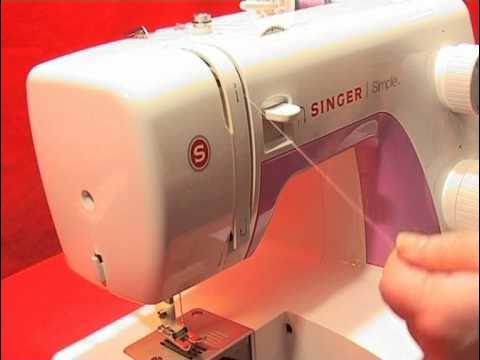
Singer Simple Threading
Threading the machine correctly is vital for creating balanced stitches. Follow these steps carefully.
- Spool Pin and Thread Guide:
- Place your spool of thread on the spool pin, usually at the top of the machine. Make sure the thread unwinds in the correct direction (check your manual, but often counter-clockwise).
- Pass the thread through the first thread guide, often a small metal loop or hook near the spool pin.
- Upper Tension Discs:
- Guide the thread down and then up, so it passes between the upper tension discs. The thread should go from right to left (or as indicated by the numbered path on the machine). Make sure the thread is properly seated in the groove of the tension discs.
- Take-Up Lever:
- Bring the thread down towards the take-up lever. The thread should pass through the eye of the take-up lever from the outside to the inside. This lever is a metal arm that moves up and down.
- Lower Thread Guides:
- Continue guiding the thread downwards. You’ll encounter more thread guides, often small metal loops or plastic posts. Ensure the thread passes through each of these in the correct sequence as marked on the machine.
- Needle Threading:
- Finally, guide the thread towards the needle. Pass the thread through the eye of the needle from front to back. Your Singer Simple likely has a needle threader, or you can do this manually. For manual threading, it’s often easier to lower the presser foot slightly to stabilize the needle.
- Bring Up the Bobbin Thread:
- Hold the needle thread loosely with your left hand.
- Turn the handwheel towards you (counter-clockwise) by one full turn. This will bring the needle down and then back up, catching the bobbin thread and bringing it up through the needle plate along with the needle thread.
- Pull the needle thread to gather a loop of the bobbin thread.
- Use scissors or a seam ripper to cut the loop and separate the needle thread from the bobbin thread.
- Position Threads: Pull both the needle thread and the bobbin thread to the back of the machine, under the presser foot.
Tip: Always re-thread the machine if you change your thread color or type, or if you’ve had a thread jam.
Singer Simple Stitch Selection and Operation
Once your machine is threaded, you’re ready to choose your stitch and begin sewing.
Singer Simple Stitch Selection
Your Singer Simple sewing machine offers a variety of stitches for different sewing tasks.
- Stitch Selector Dial: Locate the stitch selector dial. This dial will have numbers or symbols corresponding to different stitches.
- Choosing a Stitch: Rotate the dial to the desired stitch. Common stitches include:
- Straight Stitch: The most common stitch, used for seams, hemming, and general construction.
- Zigzag Stitch: Useful for finishing edges, sewing stretchy fabrics, and decorative purposes.
- Buttonhole Stitch: For creating buttonholes. Your machine might have a specific setting or a multi-step process for this.
- Other Decorative Stitches: Some models might include stitches like scallops or other patterns.
Singer Simple Basic Stitches
Let’s focus on the most frequently used stitches:
-
Straight Stitch:
- Selection: Turn the stitch selector dial to the straight stitch symbol (usually a straight line).
- Stitch Length: Use the stitch length dial to set the desired length. A common setting is around 2.0-2.5 mm for general sewing. Shorter lengths create a denser stitch, while longer lengths create a looser stitch.
- Application: Perfect for most garment construction, straight seams, and mending.
-
Zigzag Stitch:
- Selection: Turn the stitch selector dial to the zigzag stitch symbol (usually represented by a zigzag line).
- Stitch Width: If your machine has a stitch width control, use it to adjust how wide the zigzag is. A narrow zigzag (around 1.0-1.5 mm) is good for finishing seam allowances, while a wider zigzag (3.0-5.0 mm) is suitable for sewing knits or for decorative purposes.
- Application: Edge finishing to prevent fraying, sewing stretch fabrics, appliqué, and decorative embellishments.
-
Buttonhole Stitch:
- Selection: Consult your manual for the specific buttonhole settings on your Singer Simple. It may involve selecting different numbers on the stitch dial or using a special buttonhole foot.
- Application: Creating neat buttonholes for shirts, blouses, and other garments.
Singer Simple Fabric Tension Adjustment
Fabric tension refers to the balance between the upper thread and the bobbin thread. Proper tension ensures a neat and strong stitch.
- Upper Thread Tension: This is controlled by the numbered dial on the front of the machine.
- Lower Numbers: Looser upper thread tension.
- Higher Numbers: Tighter upper thread tension.
- Bobbin Thread Tension: This is usually set by the bobbin case and is less commonly adjusted. If you suspect a bobbin tension issue, it’s usually best to check that the bobbin is wound correctly and inserted properly, or consult your manual for specific bobbin case adjustment if available.
How to Test Tension:
- Prepare a Test Piece: Take a scrap of the fabric you intend to sew.
- Sew a Test Seam: Sew a straight line on the fabric scrap.
- Examine the Stitch:
- Balanced Stitch: The upper and lower threads meet evenly between the fabric layers, and the stitches look the same on both sides. This means your tension is correct.
- Upper Thread Looping on the Bottom: This indicates the upper thread tension is too loose, or the bobbin tension is too tight. Increase the upper thread tension (turn the dial to a higher number).
- Bobbin Thread Looping on the Top: This indicates the upper thread tension is too tight, or the bobbin tension is too loose. Decrease the upper thread tension (turn the dial to a lower number).
- Adjusting Incrementally: Make small adjustments to the upper tension dial (one number at a time) and test again until the stitch is balanced.
Singer Simple Foot Pedal Operation
The foot pedal controls the speed of the sewing machine.
- Gentle Pressure: Start by pressing the pedal very gently. The machine will begin to sew at a slow speed.
- Increasing Speed: As you press the pedal down further, the machine will sew faster.
- Stopping: Release pressure on the pedal to stop the machine.
- Reverse Stitch: Most Singer Simple machines have a reverse stitch lever. Hold this lever down while sewing to stitch backward, which is used to secure seams at the beginning and end.
Practice: Spend some time practicing with the foot pedal to get a feel for controlling the speed. This is key to sewing smoothly and accurately.
Sewing Techniques and Tips
With the basics covered, let’s explore some essential sewing techniques.
Sewing Different Fabrics
Your Singer Simple can handle a variety of fabrics, but some adjustments might be needed.
- Lightweight Fabrics (e.g., cotton voile, silk):
- Needle: Use a fine universal needle (size 70/10 or 80/12).
- Thread: Fine cotton or polyester thread.
- Tension: You might need slightly lower upper tension.
- Test: Always test on a scrap first, as these fabrics can fray easily.
- Mediumweight Fabrics (e.g., quilting cotton, poplin):
- Needle: Universal needle (size 80/12 or 90/14).
- Thread: All-purpose polyester thread.
- Tension: Standard tension settings usually work well.
- Heavyweight Fabrics (e.g., denim, canvas):
- Needle: Use a denim or heavy-duty needle (size 90/14 or 100/16).
- Thread: Heavy-duty polyester or cotton thread.
- Tension: You may need to increase upper tension slightly.
- Support: You might need to guide the fabric more, and thicker fabrics can be slower to sew.
Essential Sewing Accessories
While your Singer Simple comes with some accessories, others can greatly enhance your sewing experience.
- Extra Bobbins: Always have a few pre-wound bobbins ready.
- Needles: Keep a variety of needle sizes and types (universal, ballpoint for knits, denim for heavy fabrics).
- Scissors: Sharp fabric shears for cutting fabric and smaller snips for thread.
- Measuring Tape and Ruler: For accurate measurements.
- Pins: To hold fabric pieces together.
- Seam Ripper: For fixing mistakes!
- Presser Feet: While your Singer Simple might come with a standard foot, consider an all-purpose foot for general sewing, a zipper foot for installing zippers, and a buttonhole foot if it’s not integrated.
Singer Simple Maintenance and Care
Regular maintenance will keep your Singer Simple sewing machine running smoothly for years.
Singer Simple Maintenance
- Cleaning:
- Lint Removal: After each use, use a small brush (often included with your machine) to remove lint and thread fibers from the bobbin area, needle plate, and feed dogs.
- Wipe Down: Wipe the exterior of the machine with a soft, dry cloth.
- Oiling: Consult your Singer Simple manual for specific oiling instructions. Some machines require occasional oiling in specific points, while others are self-lubricating. If oiling is required, use only sewing machine oil.
- Needle Changes: Change your needle regularly, especially if you notice skipped stitches, pulled threads, or bent needles. A good rule of thumb is to change it after every 8-10 hours of sewing or at the start of a new major project.
- Bobbin Area Check: Periodically, check the bobbin area for any tangled threads or debris.
Singer Simple Troubleshooting
Even with the best care, you might encounter minor issues. Here are some common problems and their solutions.
Singer Simple Troubleshooting
| Problem | Possible Cause | Solution |
|---|---|---|
| Skipped Stitches | 1. Incorrect needle type/size 2. Dull or bent needle 3. Improper threading (upper or bobbin) 4. Lint in the bobbin area/needle plate 5. Needle inserted incorrectly |
1. Use the correct needle for your fabric. 2. Replace the needle. 3. Re-thread the machine, ensuring both upper and bobbin threads are correctly threaded. 4. Clean the bobbin area and needle plate. 5. Ensure the flat side of the needle is to the back. |
| Thread Breaking | 1. Upper thread tension too tight 2. Lint in the tension discs 3. Needle inserted incorrectly or bent 4. Thread snagging on spool or guides 5. Stitch selector set between stitches 6. Using poor quality thread |
1. Reduce upper thread tension. 2. Clean the tension discs (turn off machine, use a brush or piece of cardstock to gently clean between discs). 3. Replace or re-insert the needle. 4. Check thread path for snags. 5. Ensure the stitch selector is firmly on a stitch setting. 6. Use good quality thread. |
| Bobbin Thread Showing on Top | 1. Upper thread tension too loose 2. Bobbin not wound properly 3. Bobbin inserted incorrectly |
1. Increase upper thread tension. 2. Re-wind the bobbin evenly. 3. Ensure the bobbin is seated correctly in the bobbin case and the thread is in the tension spring. |
| Fabric Not Feeding | 1. Feed dogs are lowered 2. Presser foot not lowered 3. Lint buildup on feed dogs 4. Needle is too fine for fabric |
1. Ensure the feed dog lever (if present) is in the raised position. 2. Lower the presser foot. 3. Clean the feed dogs. 4. Try a larger needle. |
| Machine Noisy | 1. Lint buildup 2. Needs oiling 3. Loose parts 4. Machine not on a stable surface |
1. Clean the machine thoroughly. 2. Follow manual for oiling points. 3. Check for loose screws. 4. Ensure the machine is on a stable surface. |
| Buttonholes Uneven | 1. Incorrect stitch selection/width for buttonholes 2. Fabric not stable |
1. Ensure you are using the correct buttonhole setting or sequence. 2. Use a stabilizer under or on top of the fabric, or practice on a doubled fabric layer. |
If you encounter persistent problems or are unsure about a repair, it’s always best to consult your Singer Simple sewing machine manual or contact Singer customer support.
Frequently Asked Questions (FAQ)
Q: What is the best needle to use with my Singer Simple sewing machine?
A: For most general sewing with cotton or polyester fabrics, a universal needle in size 80/12 or 90/14 is a good starting point. Always match your needle to the fabric type (e.g., ballpoint for knits, denim for denim).
Q: How often should I change the needle on my Singer Simple machine?
A: It’s recommended to change your needle after every 8-10 hours of sewing or at the beginning of a new project. A dull or damaged needle can cause skipped stitches, thread breakage, and damage to your fabric.
Q: My Singer Simple is skipping stitches. What should I do?
A: Skipped stitches can be caused by several factors. First, ensure your needle is not bent or dull and is inserted correctly with the flat side facing the back. Next, re-thread the entire machine, making sure the thread is properly seated in the tension discs and take-up lever. Finally, clean out any lint or debris from the bobbin area and needle plate.
Q: Can I sew stretchy fabrics like knits on my Singer Simple?
A: Yes, you can sew stretchy fabrics on your Singer Simple, but it’s best to use a ballpoint or jersey needle and a zigzag stitch or a stretch stitch setting if your machine has one. A narrow zigzag stitch with a moderate stitch width is often effective. You may also want to use a stabilizer or a walking foot for very slippery knits.
Q: What does “Singer Simple fabric tension adjustment” mean?
A: It refers to adjusting the balance between the top thread and the bobbin thread. When the tension is balanced, your stitches will look the same on both sides of the fabric. This is usually adjusted using the numbered dial on the front of the machine.
Q: How do I perform Singer Simple maintenance?
A: Regular maintenance involves cleaning lint from the machine, especially around the bobbin area and feed dogs, with a small brush. Wiping down the exterior and ensuring the needle is clean and sharp are also key. Refer to your manual for specific oiling instructions if needed.
Q: Where can I find Singer Simple troubleshooting tips for specific issues?
A: Your Singer Simple sewing machine manual is the best resource for detailed troubleshooting. The FAQ section in this guide also covers common problems, and the table above offers solutions for various issues.
By following this comprehensive guide, you’ll be well on your way to mastering your Singer Simple sewing machine and enjoying the rewarding experience of creating with it. Happy sewing!